Showing posts with label technology_integration. Show all posts

28 January 2019

0 Don't Forget About Texting Story!!!

Texting Story app allows students to write texting stories between two characters and then saves the conversation as a video. This app is so easy to use and very intuitive! An online version may be found here.

The possibilities are ENDLESS. Here are a few ideas:
  • Dialogue between two characters or contributions of historical figures.
  • Dialogue on the characteristics of what makes a good digital citizen.
  • Conversation between the Bill of Rights / Constitution and citizens.
  • Dialogue between fiction and nonfiction / fact or opinion.
  • How would you use a specific text feature to help you learn more about a specific topic.
  • Describe characteristics of a various types of poems (narrative free verse, limerick lyrical , humorous and how they creates imagery and /or meaning.
  • Compare the various forms of energy (i.e. mechanical, sound, electrical, light or thermal).
  • Dialogue identifying and comparing the physical characteristics of the Sun, Earth, and Moon.
  • Dialogue between synonym and antonym, parts of speech, punctuation, types of sentences or cause and effect..
  • Dialogue between the types of season or day or night or rapid changes in Earth’s surface.
  • Describe the physical characteristics of place such as landforms, bodies of water, natural resources, and weather.
  • Describe tell difference between coins/money ( i.e. nickel and a quarter).
  • Why you should know the different ways to do something (i.e. addition and subtraction)?

Check out this example:

10 November 2016

0 Place Value App Smashing


Utilizing the app, Number Pieces Basic, 2nd graders created base block pictorials and uploaded them into the app, Popplet Lite. Students wrote number sentences in word form, standard form and expanded form. Then they comparied the numbers drawing a greater than/less than symbol. Students took it a step further and uploaded their project to Seesaw and explained their thinking.

I wish I could take credit for this GREAT idea but it was orignally created by Meghan Zigmond.


08 April 2016

0 Gami Book Reviews!

2nd grade students wrote a book review utilizing the app, Tellagami. Students took pictures of their book for the background of their Gami and completed the below statement stem for their recording. 

"Hello 2nd graders! 
My name is ______________ and I am reviewing the book _________________. 
I think this is a ___________ book for 2nd graders to read because ___________________, ________________, and ___________________.

11 May 2015

0 Famous Americans....Captured and QR'd!

An innovated teacher, at on one my campuses, came up with a unique idea for their Famous American curriculum writing project. 2nd grade students researched a Famous American and created apps which represented their specific Famous American.  (See the example below). Once the research was completed, students created short videos (utilization the YouTube Capture app) depicting their Famous American. QR codes were created and added to the ipad template for students/parents to view.

Examples:


30 April 2015

0 DoInk: Green Screen App: Ecosystem

3rd graders at one of my schools, created videos using the app, DoInk Green Screen on the topic of Ecosystems. (Note: DoInk is a paid app ($2.99) but well worth the price!)

The students learned how energy flows through an ecosystem and how changes to the ecosystem affect both plants and animals within the ecosystem. For their project, students were in groups of 4 and chose the following job; producer, editor, reporter and camera person. Together they brainstormed a place, an event that would change the ecosystem, and how it affected the plants and/or animals there. Students worked collaboratively to create an idea and wrote a script to produce into a broadcast.


Click here to view the finished products


25 February 2015

0 Bam! There it is!

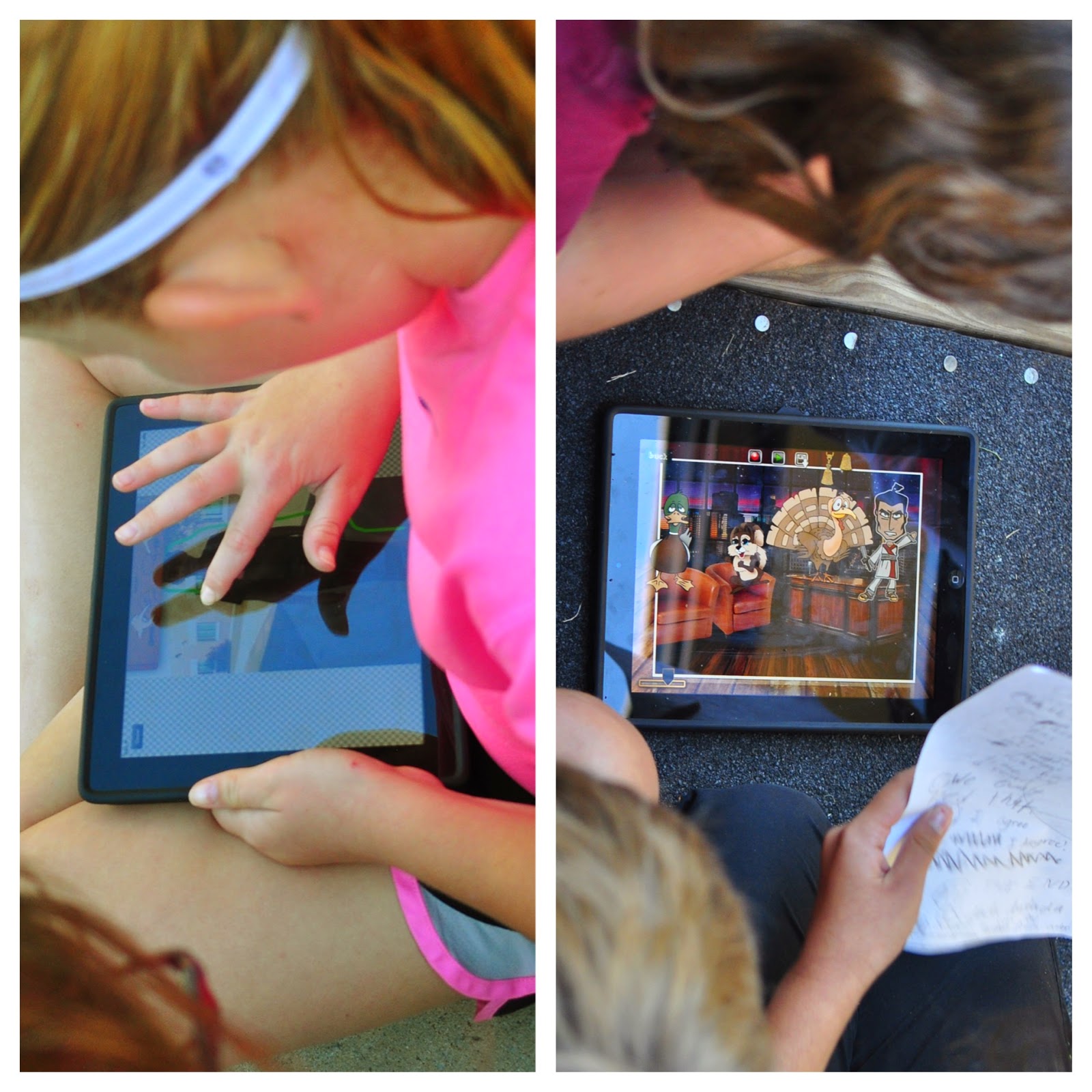
Almost 2 years ago, I blogged about a 5th grade project on App Smashing…Well, this is worth repeating but this time with another grade level. Third graders researched about a particular planet and created a Wordfoto. Then they added the Wordfoto graphic into the Phoster app. The Phoster was inserted as the background for their Tellagami.  (Bam!! There it is…the three apps, my friends!) Please see the below example:


The lead teacher for this project is phenomenal and always has specific directives and rubrics for the students to follow. Below is a snapshot of the directions and rubric she used. She also gave me permission to share the doc - should you wish to use it. http://goo.gl/tXIXnlLastly......

When I was at TCEA in February, a presenter had used a Symbaloo as a way to showcase the student’s final product. I had already uploaded the Tellegamis to a YouTube playlist but never considered using a Symboloo as showcasing the final products. How is cool is that? What is even neater? There are no suggested videos....anywhere.


15 January 2015

1 Selfies, Persuasive Writing and PicCollage - That'll Work!

4th grade students at one of my schools wrote a persuasive blurb about one of their favorite books they read this year. Utilizing the app PicCollage, students took "selfies" of their chosen book. Once printed, the bookmarks will be given to our school library available for all students to not only use as a bookmark but also persuading them to try a new book!


19 December 2014

0 Persuasive Text and the LifeCards App - A Perfect Marriage

Utilizing the app, LifeCards, 5th grade students created postcards defending/supporting their position of becoming a Patriot or remaining a Loyalist due to the events leading to and during the American Revolutionary War.

Below are a few examples as well as an interactive flipbook depicting their finished work:


08 December 2014

0 Landforms and Animoto

3rd grade students created Animotos on various landforms. With each landform, students were required to write characteristics then compare and contrast the following two landforms; hills and mountains / valleys and plains. Below is a video depicting a few student projects. 


19 November 2014

0 PicCollage App as a Formative Assessment? You Betcha'!

3rd grade teachers utilized the app, PicCollage, as a formative
Pre-Assessment on Text Features
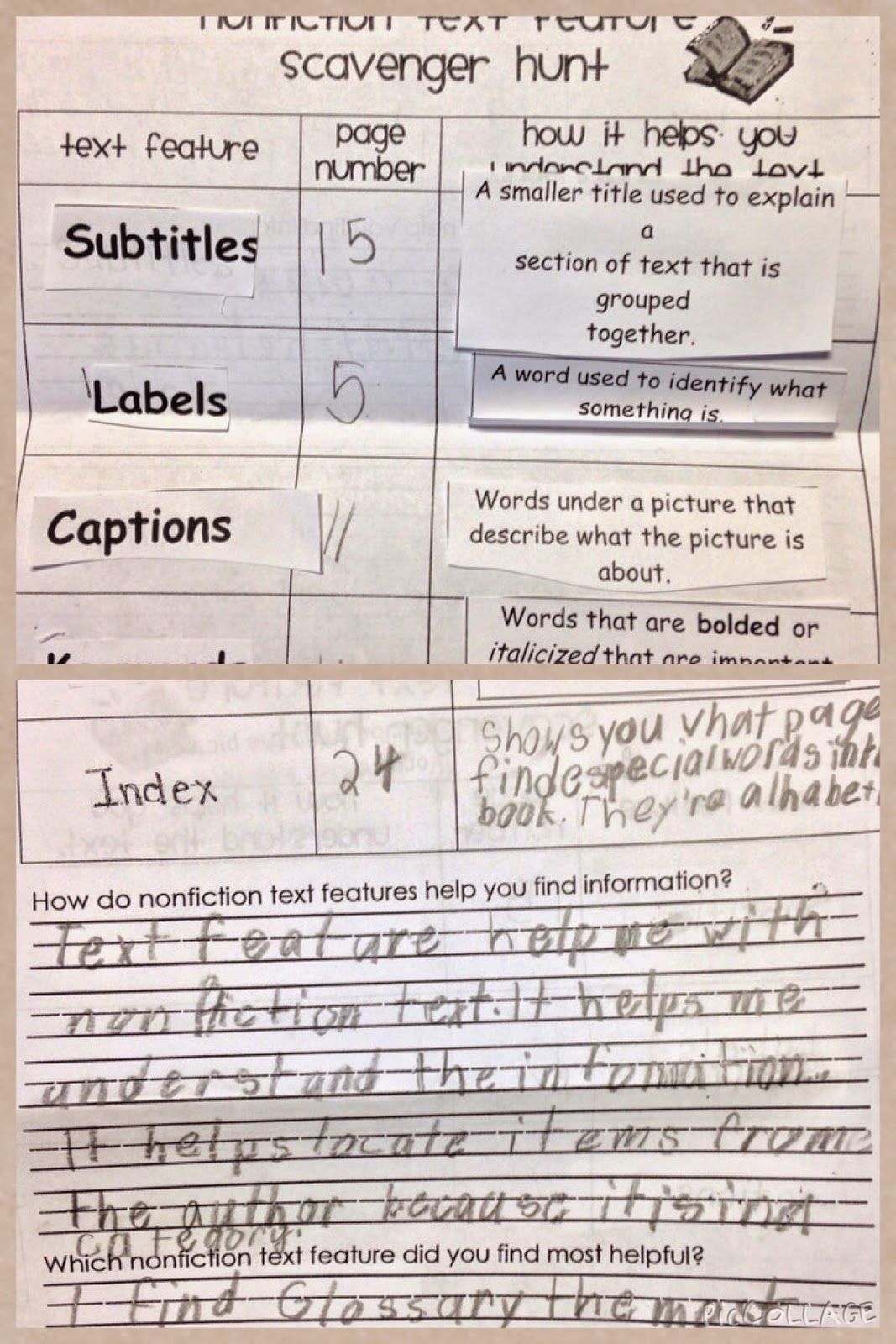
assessment on the topic of Text Features. For the pre-assessment, students took photos and labeled 6 forms of text features (caption, subtitle, glossary, index, diagrams, keywords) using the app, PicCollage. The pre-assessments were upload to Dropbox to view and the teachers used these to guide/adapt/modify their instructional teaching according to the student's learning needs and styles.

Throughout the length of the lesson, the teachers presented information/strategies to help their students learn the material through cooperative small groups. Each group had a nonfiction text with all six text feature represented. In conjunction with the active engagement sheet - (see photo below) - each student matched the text feature term with the definition and then cooperatively located the text feature in a nonfiction book.

Active Engagement Group Sheet
The teachers checked for understanding and provided immediately feedback/reteach allowing the students to attempt again. At the closing of the lesson, students gathered together to discuss the importance of text features and which helped them the most and why.

For the final formative assessment, students will recreated another PicCollage showing their knowledge/understanding of text features.


23 October 2014

1 PuppetPals: 5th Grade / Learned Behaviors and Inherited Traits

Working collaboratively, 5th grade students created PuppetPals depicting their understanding of learned behaviors and inherited traits.

Requirements of the Project: Students had to write a script/storyboard the following questions as well as provide examples of learned behaviors and inherited traits.
  • What is the difference between inherited & acquired trait?
  • What is the difference between instinctive & learned behavior?

The finished projects where downloaded to the app, Book Creator and then uploaded to YouTube. Below is an example of the finished project.

17 October 2014

2 Texas Regions: 4th Lifecards App Project

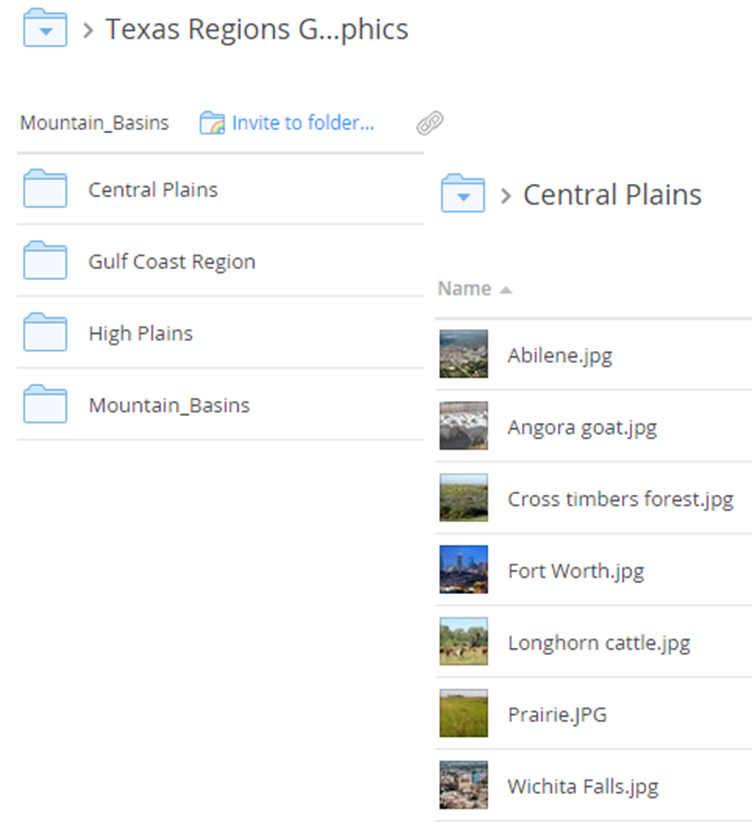
4th grade students created Texas Region postcards utilizing the app, Lifecards. Students were assigned a specific region and researched information for the project. Photos for each Texas Region were uploaded to Dropbox for students to download to the idevice.

The finished products were made into an interactive flip book (via FlipSnack - viewed best in IE) and showcased on the grade level website.

Below is an example of a finished product:


28 March 2014

0 A colleague asked .....

A colleague asked me to answer the following questions for one of her graduate assignments. I am curious on your thoughts on either of the following:

  • If technology were removed, what learning would be impossible/impaired?
  • How do you support professional development?
  • What is the best “advice” you would give for moving technology/learning forward in a way that will make more impact for all students
My thoughts are: 
If technology were removed, what learning would be impossible/impaired?
If technology were removed, I believe, it would hinder our learners to neither advance beyond knowledge and comprehensive learning nor facilitate student driven learning experiences needed to assist our student to thrive in today’s world. The utilization of technology fosters collaboration among students promoting an engaged-learning environment, which I believe, enhances critical/higher level thinking skills.
How do you support professional development?
Our technology department supports professional development in many ways to assist in meeting the needs of our staff. Our technology professional developments concentrate on increasing student achievement utilizing backwards planning to recognize the desired student’s behavior.  Additionally our professional developments are centering around the 21st Century learning skills which encompass the 4C’s: Creativity, Communication. Collaboration and Critical Thinking,
What is the best “advice” you would give for moving technology/learning forward in a way that will make more impact for all students.
The best advice I can provide is to consider the SAMR technology integration model - developed by Dr, Rubin Puentadura.  When integrating technology consider centering the lesson around the following questions:
  • What do I want my students to learn?
  • What are the student behaviors? 
The SAMR model is a useful tool to assist teachers to gradually shift to transitioning from below the line to above the line of technology integration. I highly recommend you viewing the following post by Carl Hooker, Director of Instructional Technology in Eanes ISD. He approaches the SAMR model to the analogy of a pool (“Taking a Dip in the SAMR Swimming Pool”) compared to the ladder approach. His explanation of the “SAMR Swimming Pool” provides a straightforward explanation of the SAMR model.
What are your thoughts?

12 December 2013

0 Creative Classrooms (Mobile Apps) - Lesson Submission

This post is in regards to an online class (Massive Online Open Course (MOOC) in which I am participating in on the topic of Apps/Mobile Learning. This is the last assignment that I am required to submit:

Creative Classrooms (Mobile Apps) - Lesson Submission

Lesson Title: Seasons (Grade 1)   
Subject Area: Science
Mobile platform used: iOS

TEKS Addressed in the Lesson:

TEKS:
  • Science: (1.8) Eath and space. The student knows that the natural world includes the air around us and objects in the sky.
    1. Identify identify characteristics of the seasons of the year and day and night
  • (2) Scientific investigation and reasoning. The student develops abilities to ask questions and seek answers in classroom and outdoor investigations.
    1. (A)  ask questions about organisms, objects, and events observed in the natural world
    2. (D)  record and organize data using pictures, numbers, and words
  • (3) The student knows that information and critical thinking are used in scientific problem solving.
    1. (B) make predictions based on observable patterns.
  • ELPS: c5B: write using newly acquired basic vocabulary and content-based grade-level vocabulary
Video Introduction:
How would you discuss the video with the class?
How would you teach the lesson?
How would you have students apply the lesson?
Possible apps:
  • Feltboard: ($2.99 and worth it) Using the app, Felt Board, students will create a board which demonstrates their knowledge of each season.


Another possible  idea is using the app:
  • Songify:  Turns your speech into a song ($2.99 - I believe I purchased it when it was free) Students write a poem about their favorite season, record it with Songify. You could also find photos and create an Animoto using the song from Songify. Please view the below example. (Works best in IE)

How would you assess the lesson?
  • Students will share their Feltboard and Songify/Animoto projects with the class. The teacher will post finished Feltboard project on the classroom website utilizing the Web 2.0 Flipsnack site. Finished Feltboard project URL.
  • Rubric to grade assignment: At this time (Thursday, 12Dec13)  RubiStar site will not open.
Note: Possible other videos to utilize through the lesson:
  • Discovery Streaming:
    1. Videos should be stopped throughout and facilitating questions posed to enhance learning. 
                                          i.    Magical Mother Nature: The Four Seasons (15:28)
                                        ii.    Seasons (17:30)

10 December 2013

0 Keep On and Tech On with Keep Calm-o-Matic Image Generator

Keep Calm and Carry On  - who has not seen this popular slogan! They are the trend of popularity with personalized versions at every turn!  But did you know there really is a history to this slogan?

Keep Calm and Carry On was the third in a series of World War 2 posters drawn up by the UK Ministry of Information in order to boost the morale of the British people by passing on a message from King George VI.

…After one of the original posters was recovered and placed in a British bookshop in 2000, the inspirational message was shared online, sparking a series of image macros centered around the phrase  template “Keep Calm and X”.http://knowyourmeme.com/memes/keep-calm-and-carry-on


With that being said, I stumbled across this site...with Keep Calm-o-Matic Image Generator. This user-friendly Web 2.0 app, allows one to personalize by providing options to upload your own graphic, change both the color of the background and font! It also provides many alternatives to save from a jpeg, pdf to a Facebook cover page to computer desktop wallpaper. How cool is that!

How could this be used in the classroom?
· Character traits/values, anti-bullying, achievement slogans
· Slogan a character from a book would create
· Slogan for a topic/concepts of study
· Classroom management
· Springboard for possible writing activities


Please note…No log in or sign up is needed to utilize this site…However, you do have to log in to download the image. By logging in, you may also make these graphics private. Also know, even though the site requests for nothing inappropriate, it does contain a gallery so please be mindful of possible inappropriate slogans.

29 November 2013

0 Blogging in the Classroom

I believe blogging in the classroom is an authentic way to enhance student learning skills. Not only does it assist in their overall writing skills (due to a real audience reading their posts), it also engages them, holds them accountable and addresses many of the TEKS and Common Core State Standards.

I also believe, blogging, may provide instant feedback on whether they understand the concept of the topic as well as students may both reflect and control their own learning . Additionally, that shy learner in the classroom??  What a great venue for them to speak their mind without feeling uncomfortable.

Check out the below infographic by Silvia Rosenthal Tolisano as well as her wiki about Blogging With Your Students.

21 November 2013

0 Ode to #Pencilchat: Technology Integration in the Classroom

Perfect!


18 November 2013

0 Symmetry: Where Everything is Equal

Symmetry is always a fun concept to learn about in any grade level. Here are a few great apps to use for this topic.
  • Nikki from Uncommon-to-the-Core blogspot submitted a post about a great free app, Face Symmetry Tester HD . The student products consisted of a Wall of SymMEtry of Me photos. Check out her post about this app.
  • For K/1 students the app, Felt Board ($2.99 but worth the price) is wonderful. Students may use the wide variety of props (i.e. geometric shapes hats, butterflies, trees, etc) then save to photos. Using any Whiteboard app (i.e. Doodle Buddy) students will draw lines to show symmetry/equal parts. You could also use the app, Doodle Buddy and utilize their stamps. (The stamps are limit but enough for the students to demonstrate their understanding of the concept.)

15 November 2013

0 Seasons with Felt Board and Flipsnack

This past week, I worked with kindergartners to create a project utilizing the app, Felt Board. As an extension of their learning, Kinder students demonstrated their knowledge by choosing their favorite season and creating a "felt board".  


If you are not familiar with this ipad app, Felt board ($2.99 and worth every penny!) is fun and easy for K/1 students to use. Students create "felt board" characters by selecting skin, hair color, and facial features. From there, they have the opportunity to choose from a wide variety of costumes, settings and props. It can be easily saved into photos and uploaded to Dropbox to create an ebook or interactive flipbook.

(If you are a veteran teacher like me, you may even remember the "actual" felt boards in the classroom. Good Lord, I am showing my age!)

Below is an interactive flipbook (Flipsnack) of the student's work. (Direct link should it not open correctly.) It seems to work better in IE than Chrome.

I cannot wait for their farm Unit in the Spring.


25 October 2013

0 The "Tech"ing Hour: A Spook"tech"ular Event!

Yesterday, my teachers were treated to a spook"tech"ular event during their planning time. Stations where set up, highlighting 8 productivity ipad apps for them to visit. For each station, teachers viewed a YouTube tutorial then they were asked to create a quick (hands-on) product for each station they visited.

A Halloween theme was utilized throughout the staff development and of course, goodies for them for taking time out of their busy planning schedule. They seemed truly engaged.  Please view some of the comments below.
We are so busy this time of year. Honestly, I looked at it as something else to have to do when there were many other things that seemed more important. However, it was SO nice to go in there and leave everything else at the door, have time to explore apps, and think about ways to use them. By the time I left I was very thankful we had the time set aside to do this.  
I liked that it was come and go and I got exactly what I hoped to get out of it. Thank you for taking the time and the money it must have cost to set up such a fun environment!
LOVED IT! It was very hands-on and engaging. I enjoyed being able to move at my own pace and write down notes that applied to my own subject area. I really liked the YouTube tutorial videos that further explained the app.

Check out the Animoto of the event: